Showing posts with label JMX. Show all posts

Saturday, November 13, 2010

JMX - Counting Users

Have you ever asked yourself how many users are using your favorite service at the moment? Watching the leaves falling down outside your window you ask yourself - am I alone? Is there anyone logged in except me? Hey! Stop watching the leaves, they will only make you more melancholic ;) - use the JMX :)

Read this article, and you'll discover the idea of controlling number of users logged in for web application based on Spring FrameworkSpring Security and Java Management Extensions (JMX).

First of all, we'll define the Managed Bean:
@ManagedResource(objectName = "Test:name=BigBrother")
public class BigBrother implements NotificationPublisherAware {

    private NotificationPublisher notificationPublisher;

    private final AtomicInteger userCounter = new AtomicInteger(0);

    @ManagedAttribute
    public int getUserCounter() {
        return userCounter.intValue();
    }

    @Override
    public void setNotificationPublisher(NotificationPublisher notificationPublisher) {
        this.notificationPublisher = notificationPublisher;
    }

    public void userLoggedIn(Principal principal) {
        userCounter.incrementAndGet();
        notificationPublisher.sendNotification(new Notification("User '" + principal.getName() + "' logged in.", this, 0));
    }

    public void userLoggedOut(Principal principal) {
        userCounter.decrementAndGet();
        notificationPublisher.sendNotification(new Notification("User '" + principal.getName() + "' logged out.", this, 0));
    }

}
Now we have to call the appropriate methods of this bean each time user will log in or log out.

First case is definitely the easiest one :) We may use the default behavior of Spring Security. Each time user is successfully authenticated, the Spring Security tries to publish an application event related to it. Happily for us when you use Security Namespace Configuration the default event publisher used (DefaultAuthenticationEventPublisher) sends the AuthenticationSuccessEvent. 
This type of events can be observed by the bean similar to:
public class LoginListener implements ApplicationListener<AuthenticationSuccessEvent> {

    @Autowired
    private BigBrother bigBrother;

    @Override
    public void onApplicationEvent(AuthenticationSuccessEvent event) {
        bigBrother.userLoggedIn(event.getAuthentication());
    }
}
All you have to do is register the above bean in Spring context :)

Now it's time to face the handling of user's log out. We could use nice feature of Spring Security LogoutFilter - each time user log out is handled by it, and the log out finishes successfully, the defined LogoutSuccessHandler is called. You may think - It can't be so easy - Exactly, my dear Watson, it can't be :)

You have to remember that users usually do what they want, and not what you expect them to do :) They don't have to log out from your application, then can just close the browser window, or shutdown the computer, or just leave the browser alone for so long that HTTP session will expire.

The expiration is the clue :) We can use HttpSessionBindingListener interface - if we add object implementing this interface to the HTTP session, it will be notified when it will be removed from session, which can be triggered when: a) session will be invalidated on user's log out (default behavior of  Spring Security configured using Security Namespace Configuration), b) session expires after some time of user inactivity, c) session attribute is removed on developer's demand

Let's start with the following XML configuration:
<beans xmlns="http://www.springframework.org/schema/beans"
       xmlns:security="http://www.springframework.org/schema/security"
       xmlns:xsi="http://www.w3.org/2001/XMLSchema-instance"
       xsi:schemaLocation="
           http://www.springframework.org/schema/beans    http://www.springframework.org/schema/beans/spring-beans-3.0.xsd
           http://www.springframework.org/schema/security http://www.springframework.org/schema/security/spring-security-3.0.xsd">
    ...
    <security:http auto-config='true'>
        ...
        <security:custom-filter ref="security.BigBrotherHelpingFilter" after="SECURITY_CONTEXT_FILTER" />
        ...                
    </security:http>
    ...                            
    <bean id="security.BigBrotherHelpingFilter" class="....BigBrotherHelpingFilter" />
</beans>
The above XML will add our own authentication processing filter into Spring Security filters chain, right after the SecurityContextPersistenceFilter (see: Adding in Your Own Filters). It will be something like this:
public class BigBrotherHelpingFilter extends GenericFilterBean {

    private String attributeName = "__BIG_BROTHER_HELPER";

    @Autowired
    private BigBrother bigBrother;

    @Override
    public void doFilter(ServletRequest request, ServletResponse response, FilterChain chain) throws IOException,
                    ServletException {
        chain.doFilter(request, response);
        if (((HttpServletResponse) response).isCommitted()) {
            return;
        }
        HttpSession httpSession = ((HttpServletRequest) request).getSession(false);
        if (null == httpSession) {
            return;
        }
        Authentication authentication = SecurityContextHolder.getContext().getAuthentication();

        if (null != authentication) {
            httpSession.setAttribute(attributeName, new AuthenticationHolder(authentication, bigBrother));
        } else {
            httpSession.setAttribute(attributeName, null);
        }
    }
    ...
}
And the last part of code for this post:
public class AuthenticationHolder implements HttpSessionBindingListener {

    private final Authentication authentication;

    private final BigBrother bigBrother;

    public AuthenticationHolder(Authentication authentication, BigBrother bigBrother) {
        this.authentication = authentication;
        this.bigBrother = bigBrother;
    }

    public Authentication getAuthentication() {
        return authentication;
    }

    @Override
    public void valueBound(HttpSessionBindingEvent event) {
        // Ignore ...
    }

    @Override
    public void valueUnbound(HttpSessionBindingEvent event) {
        bigBrother.userLoggedOut(authentication);
    }

}

Let's test the whole setup using VisualVM - when you run it, select your servlet container, and then available managed beans, under Test/BigBrother you should see the bean used by us:


Let's subscribe to the notifications in Notifications tab, and try to log in to our web application, you should see new notification:


When you select the Operations tab, and run getUserCounter operation you'll receive:

Now let's try to log out, then check the notifications:


and the user counter:
You can observe similar effect to log out when you leave your browser untouched until your HTTP session will expire (by default 30 minutes). 

Monday, November 1, 2010

JMX - Notification Publishing

In my previous post: JMX - Life Savior or Backdoor - I've prepared an example of JMX usage within the Spring Framework, let's modify it a little, to show the method of publishing notifications.

@ManagedResource(objectName = "Test:name=Cerberus")
public class Cerberus extends HandlerInterceptorAdapter implements NotificationPublisherAware {

    private NotificationPublisher notificationPublisher;

    private boolean opened = true;

    @ManagedOperation
    public void close() {
        this.opened = false;
        notificationPublisher.sendNotification(new Notification("Hades closed", this, 0));
    }

    @ManagedAttribute
    public boolean isOpened() {
        return opened;
    }

    @ManagedOperation
    public void open() {
        this.opened = true;
        notificationPublisher.sendNotification(new Notification("Hades opened", this, 0));
    }

    @Override
    public boolean preHandle(HttpServletRequest request, HttpServletResponse response, Object handler) throws Exception {
        if (!opened) {
            notificationPublisher.sendNotification(new Notification("Hades out of order", this, 0));
            response.sendError(HttpServletResponse.SC_NOT_FOUND);
        }
        return opened;
    }

    public void setNotificationPublisher(NotificationPublisher notificationPublisher) {
        this.notificationPublisher = notificationPublisher;
    }

}

Again we will use the VisualVM for watching our managed bean. Run it, select tomcat on the left pane, switch to the MBeans tab, select Test and then Cerberus, and finally switch to the Notifications. You will see:
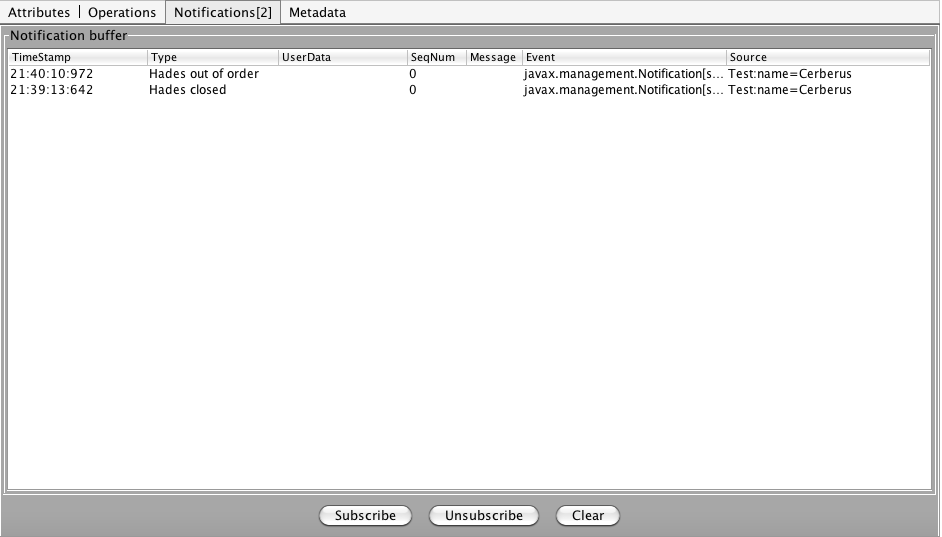
To watch the notifications coming from the managed bean you have to subscribe to them first, click on the "Subscribe" and switch to the Operations - run the close operation - and check what is visible in Notifications now:


Try to reach the URL to which the Cerberus is bound - you'll get 404 error in return (as expected), and another notification:


Running the open method will give you another one:


Now you may make yourself a cup of tea, and become a Big Brother for a while, watching the internals of your application ;)

Sunday, October 31, 2010

JMX - Life Savior or Backdoor

The Java Management Extensions (JMX) API is a standard for managing and monitoring applications and services. Its usage in application build using Spring Framework is very simple and easy. I hope you'll agree with me after lecture of this post.

We will use one of the possible solutions for JMX and Spring usage, based on Java 5 annotations. On the Spring configuration level we need only one new line:

<beans xmlns:context="http://www.springframework.org/schema/context" xmlns:xsi="http://www.w3.org/2001/XMLSchema-instance" xmlns="http://www.springframework.org/schema/beans" 
xsi:schemalocation="
           http://www.springframework.org/schema/beans
           http://www.springframework.org/schema/beans/spring-beans-3.0.xsd
           http://www.springframework.org/schema/context 
           http://www.springframework.org/schema/context/spring-context-3.0.xsd">
    ...
    <context:mbean-export />
    ...
</beans>

The rest of this magic is done at the Java source :). Let's build a handler interceptor, which will be also exported as the managed bean:

@ManagedResource(objectName = "Test:name=Cerberus")
public class Cerberus extends HandlerInterceptorAdapter {

    private boolean opened = true;

    @ManagedOperation
    public void close() {
        this.opened = false;
    }

    @ManagedAttribute
    public boolean isOpened() {
        return opened;
    }

    @ManagedOperation
    public void open() {
        this.opened = true;
    }

    @Override
    public boolean preHandle(HttpServletRequest request, HttpServletResponse response, Object handler) throws Exception {
        if (!opened) {
            response.sendError(HttpServletResponse.SC_NOT_FOUND);
        }
        return opened;
    }

}

Suppose that we map this interceptor to some URL within our web application, check if the target URL will return some response ...

Wonderful! But wait, where can we see this managed bean? - you may say :) - sometimes you need the glasses to read the newspaper ;) - We will use the VisualVM as the glasses, which will help us to see the managed beans. When we run it, we will see something like this:
Now select the Tomcat on the left pane, and when the right one will display the tomcat information, choose MBeans (Managed Beans)
From the list of Managed Beans choose Test and then Cerberus - why? We named our bean this way :) - using: @ManagedResource(objectName = "Test:name=Cerberus"), now you should see:
We used the @ManagedAttribute only on isOpened method, therefore the opened attribute will be read only. Let's switch to the Operations tab, which contains:
As you see we can run from this tab 3 methods marked with @ManagedOperation or @ManagedAttribute annotations. Let's run the close method - click on the close button and following dialog will appear:
Let's check the opened attribute using isOpened method call:
Wonderful, but what does it mean to our handler interceptor? Let's try to reach the URL protected by our Cerberus again:
It looks like the Cerberus stopped the request, sending 404 error - as we asked him to do :)

Amazing and terrifying - you can control your application behavior from outside - use it with care ...